This demo will demonstrate the basics of cluster lenses as of CosmoSim v3.1. We follow the pattern from CosmoSim Demo I and Datasets Generation, and we will not take up space to explain constructs known therefrom.
Preparation
import pandas as pd
import matplotlib.pyplot as plt
import numpy as np
import json
from CosmoSim.datagen import SimImage
import CosmoSim.Image as csimg
import CosmoSim.dataset as csd
from CosmoSim import Parameters, __version__
print( "CosmoSim version", __version__ )
CosmoSim version 3.3.0
First test of Cluster Lenses
We choose the following parameters for the first simulation.
cfg = { "simulator" : { "model" : "Raytrace", "cropsize" : 256 }
      , 'lens': { "cluster" : "SIE/5/5/8/0.3/45;SIE/-5/-5/8/0.3/45" }
      , 'source': {
            'mode': 'Spherical',
            'sigma': 5,
            'theta': 45,
            'position': 'cartesian'}
      , 'position': { 'x': 11.01, 'y': 0.31 }
      }
param = Parameters( cfg )
The new element is the lens specification, which is not as user friendly as it was.
The cluster attribute gives a list of lenses separated by semicolon.
Each constituent lens consists of the lens model ("SIE") and a list of
lens parameters separated by slash (/). For SIE, these parameters are
////, i.e. position , Einstein radius,
ellipticity, and orientation.
Given the parameters, the simulation is as before.
imsim = SimImage( param, verbose=0 )
im = imsim.getImage()
csimg.imshow( im, title="First example of a cluster lens" )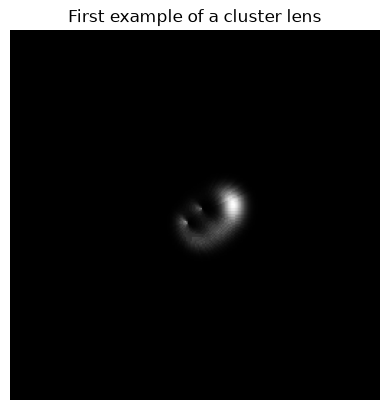
Random dataset
We can also generate random datasets. The specification is given in the cluster.toml.
cfg = csd.readtoml( "cluster.toml" )
display( json.dumps( cfg ) )
'{"simulator": {"model": "Raytrace", "size": 15000, "nterms": 4, "imagesize": 512, "cropsize": 256, "centred": true}, "dataset": {"directory": "images"}, "lens": {"mode": "SIE", "einstein-min": 3, "einstein-max": 75, "orientation-min": 0, "orientation-max": 180, "ellipseratio-min": 0.1, "ellipseratio-max": 0.9}, "cluster": {"count": 2, "maxrelativelocation": 1.2}, "source": {"mode": "SersicSphere", "n_sersic-min": 1, "n_sersic-max": 5, "luminosity-min": 20, "luminosity-max": 80, "luminosity-lambda": 2.0, "sigma-min": 5, "sigma-max": 50, "position": "critical"}, "position": {"phi-min": 0, "phi-max": 360, "r-relativemax": 1.2}}'Each constituent lens is placed in a random direction from the origin,
at a random distance upper bounded as where is
the Einstein radius and is the constant given as cluster.maxrelativelocation.
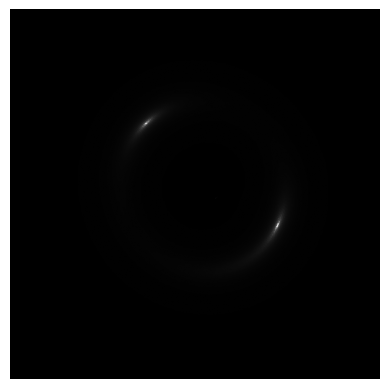
We can draw a random object as in Datasets Generation.
ob = csd.getline( cfg, fn="test.png" )
display( ob )
[getline] idx=0
[CosmoSim/py] setCluster(SIE/26.5848005759754/-5.214772548790414/67.54736133438263/0.7243347811612381/93.09964586820226;SIE/31.308786859385666/-1.7774894096933305/48.50395653403473/0.67753245124097/155.96134178066777)
index                                                         0
filename                                               test.png
model                                                  Raytrace
cluster       SIE/26.5848005759754/-5.214772548790414/67.547...
source                                             SersicSphere
R                                                     15.253087
phi                                                   47.342044
sigma                                                 47.796021
sigma2                                                 7.627658
theta                                                 10.810954
n_sersic                                               4.529333
luminosity                                            46.385306
x                                                       10.3358
y                                                     11.217304
dtype: object
param = Parameters( )
param.setRow( ob )
imsim = SimImage( param, verbose=2 )
im = imsim.getImage()
csimg.imshow( im )[GenericSim] init (verbose=2) ...
[SimImage] init (verbose=2) ...
[getSource] src=SersicSphere, ltprf0=None, verbose=2
[getSource] Lightprofile: SersicSphere LightProfileSpec.Sersic
[SphericalSource] constructor done
getSource() returns
[CosmoSim/py] setCluster(SIE/26.5848005759754/-5.214772548790414/67.54736133438263/0.7243347811612381/93.09964586820226;SIE/31.308786859385666/-1.7774894096933305/48.50395653403473/0.67753245124097/155.96134178066777)
SIE : [26.5848005759754, -5.214772548790414, 67.54736133438263, 0.7243347811612381, 93.09964586820226]
[Source] Constructor Source (Superclass)
[ClusterLens] addLens (26.5848005759754, -5.214772548790414) <CosmoSim.CosmoSimPy.SIE object at 0x7fbe01231430>
SIE : [31.308786859385666, -1.7774894096933305, 48.50395653403473, 0.67753245124097, 155.96134178066777]
[ClusterLens] addLens (31.308786859385666, -1.7774894096933305) <CosmoSim.CosmoSimPy.SIE object at 0x7fbe012b73b0>
[initSim] XY 10.335799622772457 11.21730362498011
[SphericalSource] SERSIC
[Lens] init Lens (Superclass)
[PsiFunctionLens] init PsiFunctionLens
[ClusterLens] init ClusterLens
[Lens] init Lens (Superclass)
[PsiFunctionLens] init PsiFunctionLens
[SIE] init SIE
[ClusterLens::addLens] (26.5848, -5.21477)
[Lens] init Lens (Superclass)
[PsiFunctionLens] init PsiFunctionLens
[SIE] init SIE
[ClusterLens::addLens] (31.3088, -1.77749)
[SimulatorModel] instantiating
[SimulatorModel::setLens] ClusterLens
[SimulatorModel::setSource] setting source
[SimulatorModel::setNterms] 10 -> 5
[SimulatorModel::update] Lens: ClusterLens
[Lens] Fix pt it'n 0; xi0=[10.3358, 11.2173]; Delta eta = -86.6578, 78.5865
[Lens] Fix pt it'n 1; xi0=[-76.322, 89.8038]; Delta eta = -85.1363, 81.3642
[Lens] Fix pt it'n 2; xi0=[-74.8005, 92.5816]; Delta eta = -83.572, 83.0746
[Lens] Fix pt it'n 3; xi0=[-73.2362, 94.2919]; Delta eta = -82.3755, 84.3335
[Lens] Fix pt it'n 4; xi0=[-72.0397, 95.5508]; Delta eta = -81.4673, 85.2623
[Lens] Fix pt it'n 5; xi0=[-71.1315, 96.4796]; Delta eta = -80.7815, 85.9487
[Lens] Fix pt it'n 6; xi0=[-70.4457, 97.166]; Delta eta = -80.2656, 86.4569
[Lens] Fix pt it'n 7; xi0=[-69.9298, 97.6742]; Delta eta = -79.8787, 86.8336
[Lens] Fix pt it'n 8; xi0=[-69.5429, 98.0509]; Delta eta = -79.589, 87.1131
[Lens] Fix pt it'n 9; xi0=[-69.2532, 98.3304]; Delta eta = -79.3725, 87.3206
[Lens] Fix pt it'n 10; xi0=[-69.0367, 98.5379]; Delta eta = -79.2108, 87.4748
[Lens] Fix pt it'n 11; xi0=[-68.875, 98.6921]; Delta eta = -79.0901, 87.5894
[Lens] Fix pt it'n 12; xi0=[-68.7543, 98.8067]; Delta eta = -79.0002, 87.6747
[Lens] Fix pt it'n 13; xi0=[-68.6644, 98.892]; Delta eta = -78.9331, 87.7381
[Lens] Fix pt it'n 14; xi0=[-68.5973, 98.9554]; Delta eta = -78.8832, 87.7852
[Lens] Fix pt it'n 15; xi0=[-68.5474, 99.0025]; Delta eta = -78.846, 87.8203
[Lens] Fix pt it'n 16; xi0=[-68.5102, 99.0376]; Delta eta = -78.8183, 87.8465
[Lens] Fix pt it'n 17; xi0=[-68.4825, 99.0638]; Delta eta = -78.7976, 87.8659
[Lens] Fix pt it'n 18; xi0=[-68.4618, 99.0832]; Delta eta = -78.7823, 87.8804
[Lens] Fix pt it'n 19; xi0=[-68.4465, 99.0977]; Delta eta = -78.7708, 87.8911
[Lens] Good approximation: xi0=[-68.4465, 99.0977]; xi1=[-68.435, 99.1084]
[Lens::getXi] [10.3358, 11.2173] -> [-68.435, 99.1084]
[setNu] etaOffset set to zero.
[SimulatorModel::update] Done updateApparentAbs()
[SimulatorModel::update] thread section
[Source::getImage()]
[SimulatorModel::updateInner()] eta=[10.3358, 11.2173]
[SimulatorModel::updateInner()] xi=[-68.435, 99.1084]; eta=[10.3358, 11.2173]; etaOffset=[0, 0]
[SimulatorModel::updateInner()] nu=[-68.435, 99.1084]
[calculateAlphaBeta] [[-68.435, 99.1084]] ...
[ClusterLens->calculateAlphaBeta()] 5; [-68.435, 99.1084]
[PsiFunctionLens.calculateAlphaBeta()] 5; 67.5474 - [-68.435, 99.1084]
[PsiFunctionLens.calculateAlphaBeta()] done
[PsiFunctionLens.calculateAlphaBeta()] 5; 48.504 - [-68.435, 99.1084]
[PsiFunctionLens.calculateAlphaBeta()] done
[calculateAlphaBeta] done
[RaytraceModel::parallelDistort] ClusterLens (Spherical Source)
Time to update(): 61 milliseconds
[Simulator] Centre Point (16.84,6.26) (Centre of Luminence in Planar Co-ordinates)
[getImage] centring from parameters: None
[SimulatorModel::getDistorted()]
[SIE] destructing SIE
[PsiFunctionLens] destructing PsiFunctionLens
[Lens] destructing Lens (Superclass)
[SIE] destructing SIE
[PsiFunctionLens] destructing PsiFunctionLens
[Lens] destructing Lens (Superclass)
[ClusterLens] destructing ClusterLens
[PsiFunctionLens] destructing PsiFunctionLens
[Lens] destructing Lens (Superclass)
[SimulatorModel] destructing
[Source] Destructor Source (Superclass)
A sample
def mkimg(ob):
      p0 = Parameters( )
      p0.setRow( ob )
      sim = SimImage( p0, verbose=0 )
      return sim.getImage()
obs = [ csd.getline( cfg ) for _ in range(8) ]
ims = [ mkimg(ob) for ob in obs ]
ts = [ f"Image {i}" for i in range(8) ]
csimg.showImages( ims, size=(2,4), titles=ts )[getline] idx=0
[CosmoSim/py] setCluster(SIE/-20.139878107835354/-31.131672904999675/55.929931795577644/0.8552746193732491/147.0980574821742;SIE/-58.30206771381716/8.50380154128464/66.5274185435778/0.31541440912148133/145.85784331937373)
[getline] idx=0
[CosmoSim/py] setCluster(SIE/4.986987673485304/-59.23952905916106/65.89792832893502/0.8244949637939075/77.00319756845842;SIE/67.3651040941358/-5.454396605318781/72.08676309286068/0.44008167487603367/93.16001584104839)
[Lens] init Lens (Superclass)
[PsiFunctionLens] init PsiFunctionLens
[ClusterLens] init ClusterLens
[Lens] init Lens (Superclass)
[PsiFunctionLens] init PsiFunctionLens
[SIE] init SIE
[ClusterLens::addLens] (-20.1399, -31.1317)
[Lens] init Lens (Superclass)
[PsiFunctionLens] init PsiFunctionLens
[SIE] init SIE
[ClusterLens::addLens] (-58.3021, 8.5038)
[Lens::criticalXi] Fix pt it'n 0; r0=10
[Lens::criticalXi] [Lens] Good approximation: r0=10; r1=104.904
[SIE] destructing SIE
[PsiFunctionLens] destructing PsiFunctionLens
[Lens] destructing Lens (Superclass)
[SIE] destructing SIE
[getline] idx=0
[CosmoSim/py] setCluster(SIE/25.765852622941285/-19.28432597293915/27.779299597354196/0.8525128039792131/37.08690062117377;SIE/45.95645435392523/-24.017777434901944/69.79819809614217/0.5861341510453641/174.1145567008173)
[PsiFunctionLens] destructing PsiFunctionLens
[Lens] destructing Lens (Superclass)
[ClusterLens] destructing ClusterLens
[PsiFunctionLens] destructing PsiFunctionLens
[Lens] destructing Lens (Superclass)
[Lens] init Lens (Superclass)
[PsiFunctionLens] init PsiFunctionLens
[ClusterLens] init ClusterLens
[Lens] init Lens (Superclass)
[PsiFunctionLens] init PsiFunctionLens
[SIE] init SIE
[ClusterLens::addLens] (4.98699, -59.2395)
[Lens] init Lens (Superclass)
[PsiFunctionLens] init PsiFunctionLens
[SIE] init SIE
[ClusterLens::addLens] (67.3651, -5.4544)
[Lens::criticalXi] Fix pt it'n 0; r0=10
[Lens::criticalXi] [Lens] Good approximation: r0=10; r1=88.0541
[SIE] destructing SIE
[PsiFunctionLens] destructing PsiFunctionLens
[Lens] destructing Lens (Superclass)
[SIE] destructing SIE
[getline] idx=0
[CosmoSim/py] setCluster(SIE/11.542756165381578/46.11842995586732/66.65318659233527/0.3679905538221113/151.99879051273044;SIE/-6.617158384296733/0.1685899246250043/14.89363173255832/0.8231942244123095/119.22212953772598)
[PsiFunctionLens] destructing PsiFunctionLens
[Lens] destructing Lens (Superclass)
[ClusterLens] destructing ClusterLens
[PsiFunctionLens] destructing PsiFunctionLens
[Lens] destructing Lens (Superclass)
[Lens] init Lens (Superclass)
[PsiFunctionLens] init PsiFunctionLens
[ClusterLens] init ClusterLens
[Lens] init Lens (Superclass)
[PsiFunctionLens] init PsiFunctionLens
[SIE] init SIE
[ClusterLens::addLens] (25.7659, -19.2843)
[Lens] init Lens (Superclass)
[PsiFunctionLens] init PsiFunctionLens
[SIE] init SIE
[ClusterLens::addLens] (45.9565, -24.0178)
[Lens::criticalXi] Fix pt it'n 0; r0=10
[Lens::criticalXi] [Lens] Good approximation: r0=10; r1=100.677
[SIE] destructing SIE
[PsiFunctionLens] destructing PsiFunctionLens
[Lens] destructing Lens (Superclass)
[SIE] destructing SIE
[getline] idx=0
[CosmoSim/py] setCluster(SIE/40.68251227822038/17.11642572307718/46.97786188864985/0.6913116456152286/18.757781048598655;SIE/1.2457999699125686/3.2284227514359234/6.17570885364802/0.41430839651623463/23.307147134507748)
[PsiFunctionLens] destructing PsiFunctionLens
[Lens] destructing Lens (Superclass)
[ClusterLens] destructing ClusterLens
[PsiFunctionLens] destructing PsiFunctionLens
[Lens] destructing Lens (Superclass)
[Lens] init Lens (Superclass)
[PsiFunctionLens] init PsiFunctionLens
[ClusterLens] init ClusterLens
[Lens] init Lens (Superclass)
[PsiFunctionLens] init PsiFunctionLens
[SIE] init SIE
[ClusterLens::addLens] (11.5428, 46.1184)
[Lens] init Lens (Superclass)
[PsiFunctionLens] init PsiFunctionLens
[SIE] init SIE
[ClusterLens::addLens] (-6.61716, 0.16859)
[Lens::criticalXi] Fix pt it'n 0; r0=10
[Lens::criticalXi] [Lens] Good approximation: r0=10; r1=65.1075
[SIE] destructing SIE
[PsiFunctionLens] destructing PsiFunctionLens
[Lens] destructing Lens (Superclass)
[SIE] destructing SIE
[getline] idx=0
[CosmoSim/py] setCluster(SIE/-5.072936884720457/0.5638588167478582/16.220789564931216/0.7504999386047251/88.03080047147554;SIE/39.65296121499746/-2.958246641515275/52.99654472012345/0.7504047566530224/38.626788142343436)
[PsiFunctionLens] destructing PsiFunctionLens
[Lens] destructing Lens (Superclass)
[ClusterLens] destructing ClusterLens
[PsiFunctionLens] destructing PsiFunctionLens
[Lens] destructing Lens (Superclass)
[Lens] init Lens (Superclass)
[PsiFunctionLens] init PsiFunctionLens
[ClusterLens] init ClusterLens
[Lens] init Lens (Superclass)
[PsiFunctionLens] init PsiFunctionLens
[SIE] init SIE
[ClusterLens::addLens] (40.6825, 17.1164)
[Lens] init Lens (Superclass)
[PsiFunctionLens] init PsiFunctionLens
[SIE] init SIE
[ClusterLens::addLens] (1.2458, 3.22842)
[Lens::criticalXi] Fix pt it'n 0; r0=10
[Lens::criticalXi] [Lens] Good approximation: r0=10; r1=53.3464
[SIE] destructing SIE
[PsiFunctionLens] destructing PsiFunctionLens
[Lens] destructing Lens (Superclass)
[SIE] destructing SIE
[getline] idx=0
[CosmoSim/py] setCluster(SIE/53.05218731278817/-20.60191621125469/57.50772933664179/0.5582187438611935/131.8926453560755;SIE/14.994649780464915/-35.46871653068226/32.998760619350584/0.12147378191579286/75.04074265151188)
[PsiFunctionLens] destructing PsiFunctionLens
[Lens] destructing Lens (Superclass)
[ClusterLens] destructing ClusterLens
[PsiFunctionLens] destructing PsiFunctionLens
[Lens] destructing Lens (Superclass)
[Lens] init Lens (Superclass)
[PsiFunctionLens] init PsiFunctionLens
[ClusterLens] init ClusterLens
[Lens] init Lens (Superclass)
[PsiFunctionLens] init PsiFunctionLens
[SIE] init SIE
[ClusterLens::addLens] (-5.07294, 0.563859)
[Lens] init Lens (Superclass)
[PsiFunctionLens] init PsiFunctionLens
[SIE] init SIE
[ClusterLens::addLens] (39.653, -2.95825)
[Lens::criticalXi] Fix pt it'n 0; r0=10
[Lens::criticalXi] [Lens] Good approximation: r0=10; r1=56.9513
[SIE] destructing SIE
[PsiFunctionLens] destructing PsiFunctionLens
[Lens] destructing Lens (Superclass)
[SIE] destructing SIE
[getline] idx=0
[CosmoSim/py] setCluster(SIE/-2.3727853429888284/42.06697958648047/43.547325356682315/0.21452145974632775/7.389267831157278;SIE/25.73900032873311/-36.23834755101322/67.89604746009523/0.5473131597430009/125.34213658863112)
[PsiFunctionLens] destructing PsiFunctionLens
[Lens] destructing Lens (Superclass)
[ClusterLens] destructing ClusterLens
[PsiFunctionLens] destructing PsiFunctionLens
[Lens] destructing Lens (Superclass)
[Lens] init Lens (Superclass)
[PsiFunctionLens] init PsiFunctionLens
[ClusterLens] init ClusterLens
[Lens] init Lens (Superclass)
[PsiFunctionLens] init PsiFunctionLens
[SIE] init SIE
[ClusterLens::addLens] (53.0522, -20.6019)
[Lens] init Lens (Superclass)
[PsiFunctionLens] init PsiFunctionLens
[SIE] init SIE
[ClusterLens::addLens] (14.9946, -35.4687)
[Lens::criticalXi] Fix pt it'n 0; r0=10
[Lens::criticalXi] [Lens] Good approximation: r0=10; r1=80.8347
[SIE] destructing SIE
[PsiFunctionLens] destructing PsiFunctionLens
[Lens] destructing Lens (Superclass)
[SIE] destructing SIE
[PsiFunctionLens] destructing PsiFunctionLens
[Lens] destructing Lens (Superclass)
[ClusterLens] destructing ClusterLens
[PsiFunctionLens] destructing PsiFunctionLens
[Lens] destructing Lens (Superclass)
[Lens] init Lens (Superclass)
[PsiFunctionLens] init PsiFunctionLens
[ClusterLens] init ClusterLens
[Lens] init Lens (Superclass)
[PsiFunctionLens] init PsiFunctionLens
[SIE] init SIE
[ClusterLens::addLens] (-2.37279, 42.067)
[Lens] init Lens (Superclass)
[PsiFunctionLens] init PsiFunctionLens
[SIE] init SIE
[ClusterLens::addLens] (25.739, -36.2383)
[Lens::criticalXi] Fix pt it'n 0; r0=10
[Lens::criticalXi] [Lens] Good approximation: r0=10; r1=55.8525
[SIE] destructing SIE
[PsiFunctionLens] destructing PsiFunctionLens
[Lens] destructing Lens (Superclass)
[SIE] destructing SIE
[PsiFunctionLens] destructing PsiFunctionLens
[Lens] destructing Lens (Superclass)
[ClusterLens] destructing ClusterLens
[PsiFunctionLens] destructing PsiFunctionLens
[Lens] destructing Lens (Superclass)
[setDebug] 0
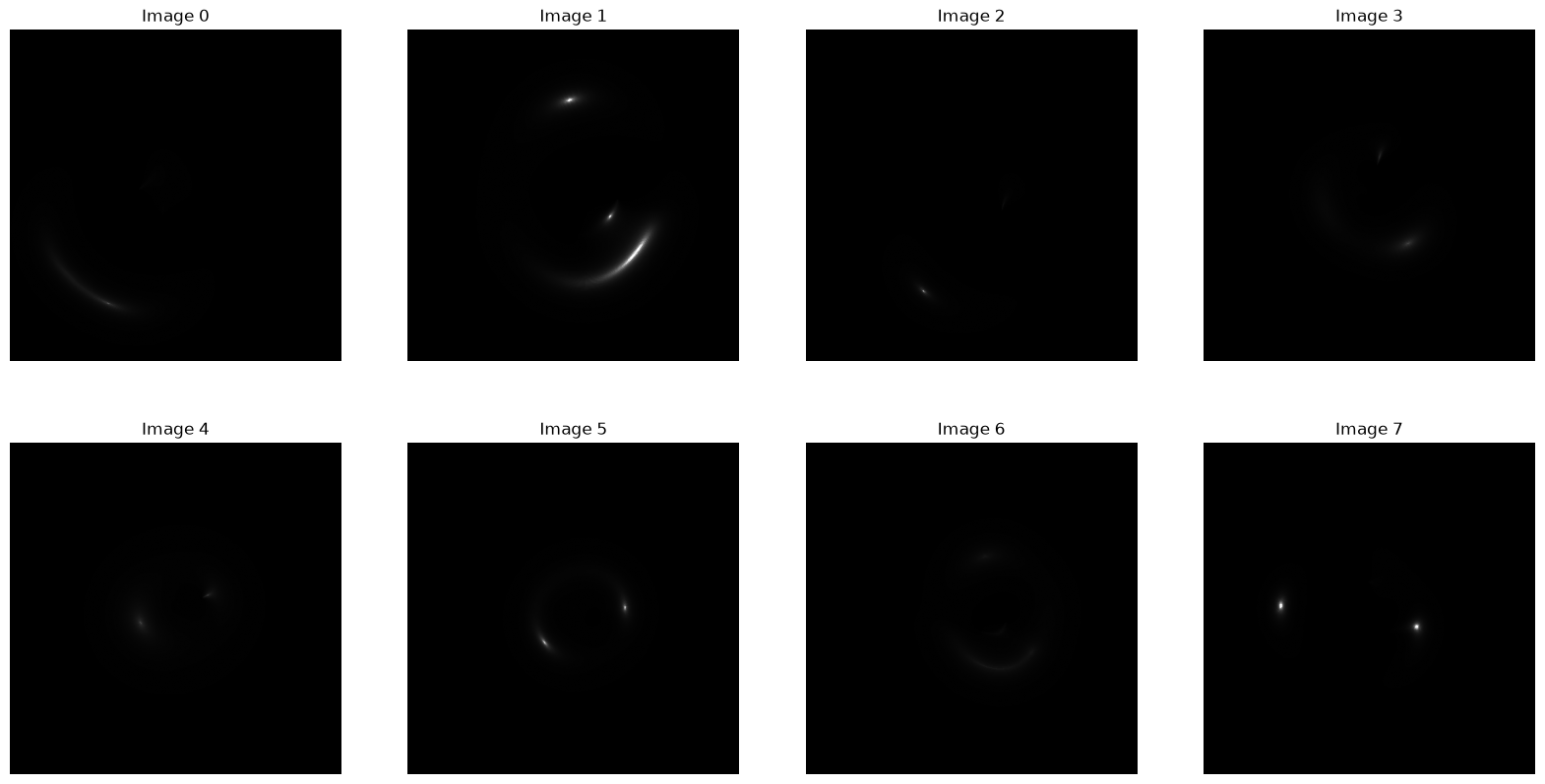
If we take a particular interest in one particular image, say no 1, we can easily inspect its parameters.
print( obs[1] )index 0
filename image-000000.png
model Raytrace
cluster SIE/4.986987673485304/-59.23952905916106/65.89...
source SersicSphere
R 18.98169
phi 23.721917
sigma 21.001877
sigma2 20.280927
theta 43.585753
n_sersic 3.446259
luminosity 51.725722
x 17.377904
y 7.636296
dtype: object
The cluser specification does not show in the row view, but we can single that one out to see properly.
print( obs[1]["cluster"] )SIE/4.986987673485304/-59.23952905916106/65.89792832893502/0.8244949637939075/77.00319756845842;SIE/67.3651040941358/-5.454396605318781/72.08676309286068/0.44008167487603367/93.16001584104839
Closure
Parameter design for random sets of cluster lenses is still a concern for further research.